Artingent
Whimsical Cyberpunk Alley Network
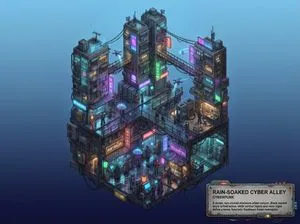
Whimsical miniature world depiction of a rain-soaked alley network in cyberpunk style.
Browse 13 community-created prompts with real results.
Whimsical miniature world depiction of a rain-soaked alley network in cyberpunk style.

2x2 grid, do this for 4 famous PHD level science or math topics <instructions> Input Variable: {argument name="theorem or formula" default="Theorem / Formula"} Phase 1: Schematic Decomposition Analyze the Notation: Identify the primary visual language of the scientist (Chalk on blackboard? Ink on parchment? Pencil on graph paper?). Identify the "Structure": If this theory were a building, what would it look like? Logic: Chaos Theory -> Fractal Spire. Thermodynamics -> Engine Block. Phase 2: The Dimensional Transition The Base: A flat surface covered in the [Notation Medium] (e.g., a slate blackboard covered in chalk equations). The Extrusion: The chalk lines physically lift off the surface. They begin as white wireframes, then gain opacity, then gain texture. The Climax: At the top of the image, the wireframes have fully solidified into a photorealistic, impossible structure representing the theory. The Observer: A tiny, scale-model figure of the scientist stands on the flat "2D" section, looking up in awe at the massive "3D" structure they have summoned. Output: High-Angle Isometric, "3D mod designer toy" style, stark contrast between sketchy lines and solid mass. </instructions>
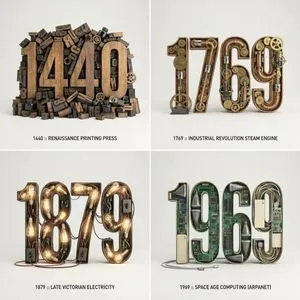
2x2 grid, do this for 4 important years in history and their most important inventions { Anchor: `[Letter/Number] :: [Era/Theme (e.g., 1980s Retro Tech / Victorian Steampunk)]::4` Morphology: `3D Typographic sculpture of [Letter/Number], character shape defined by a dense pile of [Era/Theme] objects, chaotic but legible assemblage, graphic design asset::3` Material Physics: `Textures of [Era/Theme] objects (plastic, rust, wood), occlusion between stacked items, realistic scale of constituent parts forming the glyph::3` Illumination: `Three-point studio lighting, softbox overhead, clean background for isolation::2` Render Stack: `Cinema 4D render, isometric or front-facing, ambient occlusion, 8k, Adobe Substance material suite::1` Negative: `[Illegible, flat font, 2D, handwriting, paper, messy background, floating objects]:: -1`}
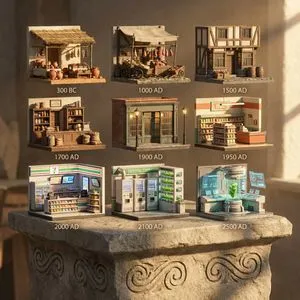
A 3x3 grid of ultra-detailed 12K 3D-rendered tiny scenes depicting grocery shops through ages, scaled at 1:12. Placed on AI inferred material pedestal with engraved motifs. Warm afternoon rays from right create intimate, sharp castings. Panels cover 300 BC, 1000 AD, 1500 AD, 1700 AD, 1900 AD, 1950 AD, 2000 AD, 2100 AD, and future 2500 AD variants.
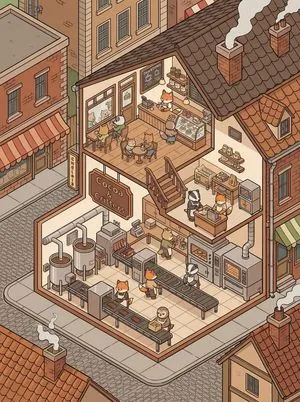
Highly detailed isometric 2.5D architectural slice illustration of a lively {argument name="scene name" default="[SCENE NAME]"}, shown as a cropped section of a multi-story building integrated within a surrounding neighborhood. The scene fills the frame edge-to-edge and feels like part of a larger living world. The building interior is revealed through a clean sectional cutaway with two or three stacked levels connected by stairs. The layout is simple, organized and easy to read with limited objects in each area so every element is clearly visible. All characters are small cute anthropomorphic animals behaving like people and living daily life logically according to the scene. Each room has a clear purpose related to the scene theme, with furniture and tools used naturally. Architecture uses clean walls, tiled surfaces, wood and metal structures with pipes, vents and machines integrated neatly. Outside the cutaway walls the surrounding environment is visible with nearby buildings, rooftops, windows and streets, creating context without overcrowding the composition. Balanced composition, comfortable spacing, clear visual hierarchy, crisp line art, sharp details, vibrant but controlled colors, high clarity so every object and character is easy to see. Negative Prompt: humans, people, overcrowded scene, dense environment, too many objects, messy layout, cluttered composition, tiny unreadable details, blurry, low detail, washed colors, pastel washed colors, isolated floating building, plain background
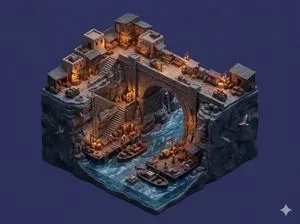
SCENE: A trading settlement built around a large stone bridge crossing a deep river gorge with shops, storage sheds, and stairways leading to dock platforms below. Tiny traders move goods while birds glide along canyon walls. STYLE: Create a premium stylized miniature diorama where canyon terrain and river water form a continuous sculpted base integrated with market structures. The entire diorama floats in mid-air inside a blank single-color background environment that contrasts with the rocky terrain. Use stylized resin water, compact shops, and rope docks. Include miniature traders, carts, birds, barrels, crates, and rope details to reinforce handcrafted miniature storytelling scale. Lock the render to 4:3. LIGHTING: The scene occurs in late evening after sunset with very low natural light. Ambient lighting remains dim while lanterns, shop lights, and small lamps illuminate the bridge and market stalls. These lights create warm glowing pockets of illumination across the trading post while surrounding canyon surfaces remain darker, producing strong contrast and dramatic miniature depth. CAMERA: Use an isometric camera capturing the entire floating diorama clearly from top to bottom and side to side.
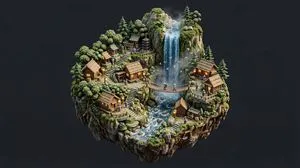
SCENE: A peaceful village built along the edge of a tall forest waterfall with small shrines, wooden houses, rope bridges, and viewing platforms carved into the cliff. Tiny villagers carry baskets along stone paths while birds fly through the mist and moss grows on the rocks. STYLE: Create a premium stylized miniature diorama whose terrain base blends naturally with the environment so cliffs, forest floor, and flowing water form a continuous sculpted model. The entire diorama including the terrain base should float freely in mid-air without resting on any table or platform. Surround the diorama with a blank single-color environment that contrasts with the scene so the miniature stands out clearly. Use stylized resin waterfall effects, compact architecture, warm lantern glow, and dense foliage clusters. Include miniature villagers, birds, baskets, shrubs, and path props to reinforce handcrafted collectible scale. Lock the render to a 4:3 aspect ratio. CAMERA: Use an isometric camera angle positioned high enough to clearly view the terrain layers and structures. Frame the entire floating diorama so the full base and environment are visible from top to bottom and side to side with comfortable margins.
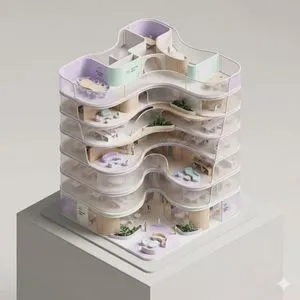
A conceptual architectural isometric model of an organic-form corporate office tower, presented as an exhibition-scale diorama. The building is shown with a cutaway section, exposing fluid spatial flow, curved meeting rooms, and lounge zoning from a top-down isometric perspective. Volumes are lightly separated by seamlessly curved translucent partitions to suggest circulation and function. Warm micro-LEDs illuminate the individual floors from within. Strong use of negative space and clear compositional hierarchy. Thin structural outlines, soft pastel lavender and mint, ribbed wood and dark terrazzo tones, minimal abstract signage, subtle human-scale markers. Smooth surfaces, pill-shaped rounded edges, dramatic controlled studio lighting, architectural model photography style, clean dark neutral background, high-detail yet minimal.
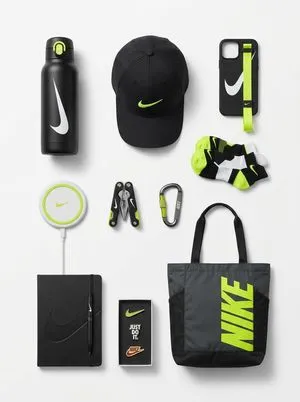
[Brand Name], conceptualized as a cohesive, premium "capsule collection" of branded merchandise and functional souvenirs. The image displays a curated set of various physical objects (such as tech accessories, utility gear, lifestyle items, or stationery) that are semantically relevant to the brand's specific industry and audience. Every item is designed using the brand's official signature color palette and features bold logo integration. The objects are arranged in a clean, organized group composition (knolling or isometric perspective) on a seamless, infinite studio white background. The lighting is soft and professional, creating subtle shadows. The framing is wide, ensuring significant negative space (air) surrounds the product grouping on all sides.

“Create a clear, 45° top-down isometric miniature 3D diorama of a real-world wildlife habitat: {argument name="habitat type" default="[HABITAT TYPE]"}. Use soft refined textures, realistic PBR materials, and natural daylight. Build a raised base featuring terrain details, vegetation, water sources, and rocks. Include tiny stylized animals in natural positions. Use a clean solid {argument name="background color" default="[BACKGROUND COLOR]"} background.”
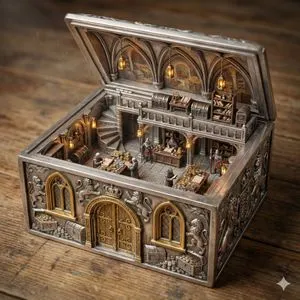
ORNATE BOX DIORAMA — TRI-LAYER MASTER PROMPT (HARD FRONT-RIGHT ISOMETRIC) THEME_LOCATION = Royal Treasury Counting Room BOX_VARIABLE = Silver DOOR_MATERIAL = Gold WINDOW_MATERIAL = Gold WINDOW_PANE_MATERIAL = FLOOR_MATERIAL = STAIRCASE_TYPE = Spiral STAIRCASE_MATERIAL = Silver MEZZANINE_FLOOR_MATERIAL = Silver DIORAMA_LIGHTING = ======================== LAYER 1 — PHYSICAL GEOMETRY (HIGHEST PRIORITY) The ornate antique box is a solid rigid container transformed into architecture. If BOX_VARIABLE is specified, the entire container and its carved architectural structure must be made from that material. If BOX_VARIABLE is empty, infer logically from THEME_LOCATION. The full outer shell must remain intact on all sides. No removed walls. No dollhouse cutaway. FRONT FACADE LOCK: The FRONT SIDE must contain: • exactly ONE centered door • exactly TWO windows • one window left of the door • one window right of the door Openings must be carved THROUGH the existing wall. Apply DOOR_MATERIAL / WINDOW_MATERIAL / WINDOW_PANE_MATERIAL if specified, otherwise infer logically. Front wall must remain structurally thick and complete. ORNAMENTAL DEPTH CONTINUITY LOCK: All carvings must continue through wall thickness. Frames must appear carved from the same solid material. Interior walls share identical structural thickness. The lid must match base width and length and be hinge-connected. ======================== LAYER 2 — SCENE LOGIC Create a two-level miniature THEME_LOCATION fully integrated into the container. Use FLOOR_MATERIAL / STAIRCASE_TYPE / STAIRCASE_MATERIAL / MEZZANINE_FLOOR_MATERIAL if specified, otherwise infer logically. Upper level attaches directly to container walls. The inside of the lid functions as the vaulted ceiling. All props, materials, and architecture must match THEME_LOCATION. ======================== LAYER 3 — RENDER & CAMERA Ultra-realistic cinematic miniature diorama photography. Use DIORAMA_LIGHTING if specified. ======================== HARD FRONT-RIGHT ISOMETRIC CAMERA SYSTEM CORNER ANCHOR RULE: The FRONT-RIGHT TOP CORNER of the box must be the closest point to the viewer. WALL VISIBILITY RATIO RULE: The front wall must occupy slightly more visible area than the right wall. Approximate visual dominance: • front wall ≈ 60% visibility • right wall ≈ 40% visibility Both must be clearly visible simultaneously. RIM OCCLUSION RULE: Camera must remain above the front wall rim. The top edge of the front wall must overlap a small portion of the interior floor. Interior must be seen OVER the wall, never through a missing wall. FORBIDDEN CAMERA POSITIONS: Do NOT center the camera on the front wall. Do NOT use a straight frontal view. Do NOT use a top-down view. Do NOT prioritize interior visibility over box geometry. COMPOSITION TARGET: The image must resemble a professionally photographed miniature collectible box viewed from a stable elevated front
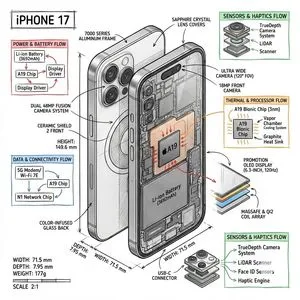
Create a technical infographic of {argument name="object name" default="[OBJECT NAME]"} with a 45-degree isometric 3D perspective showing the device slightly tilted to reveal depth and dimension. Combine a realistic photoreal render with black ink technical annotations on pure white background. Include: Key component labels with color-coded callout boxes Internal component visibility through transparent/cutaway sections Measurements, dimensions, and precise scale markers Material callouts and quantities Color-coded arrows for function/flow: RED (power/battery), BLUE (data/connectivity), ORANGE (thermal/processor), GREEN (sensors/haptics) Simple schematics or cross-sectional diagrams where relevant Place “OBJECT NAME” title in a hand-drawn technical box (top-left corner). Style: Black linework (technical pen/architectural), sketched but precise. Object remains clearly visible. Educational museum-exhibit vibe. Clean composition, balanced negative space. Perspective: Isometric 3D angle—tilted to show depth, dimension, and internal architecture dramatically. Like a professional product teardown or engineering manual. Colors: ~10–15% accent density. Black dominant. White background. Output: 1080×1080, ultra-crisp, social-feed optimized.
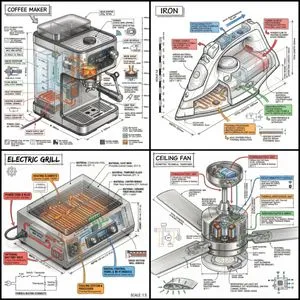
“Create a technical infographic of {argument name="object" default="OBJECT"} with a 45-degree isometric 3D perspective showing the device slightly tilted to reveal depth and dimension. Combine a realistic photoreal render with black ink technical annotations on pure white background. Include: Key component labels with color-coded callout boxes Internal component visibility through transparent/cutaway sections Measurements, dimensions, and precise scale markers Material callouts and quantities Color-coded arrows for function/flow: RED (power/battery), BLUE (data/connectivity), ORANGE (thermal/processor), GREEN (sensors/haptics) Simple schematics or cross-sectional diagrams where relevant Place “OBJECT” title in a hand-drawn technical box (top-left corner). Style: Black linework (technical pen/architectural), sketched but precise. Object remains clearly visible. Educational museum-exhibit vibe. Clean composition, balanced negative space. Perspective: Isometric 3D angle—tilted to show depth, dimension, and internal architecture dramatically. Like a professional product teardown or engineering manual. Colors: ~10-15% accent density. Black dominant. White background. Output: 1080×1080, ultra-crisp, social-feed optimized.”